
Video & Music Clip Bookmarker
Bookmark the exact moment on YouTube, YouTube Kids, SoundCloud, and YouTube Music, then turn any stretch into a replayable clip — marked straight from the player and organized with categories, tags, and search. Built for producers, DJs, teachers, students, researchers, social-media managers, and journalists who live in the timeline.
Key Features
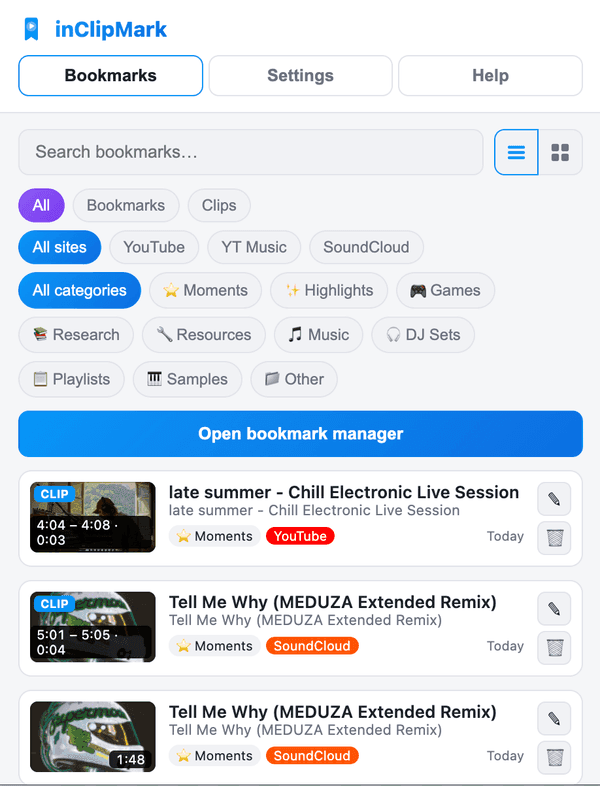
Save the exact moment with the in-player button or the right-click menu — no pausing, no typing.
Record a start-to-stop range straight from the player. Clips replay and auto-pause, with an on-player badge marking the spot.
One extension across YouTube, YouTube Kids, SoundCloud and YouTube Music — each site is its own small adapter.
A whole-page tab to search and filter by type, platform and category in row or thumbnail views — edit, delete, or jump right back to the moment. The same views live in the popup.
Organize everything with fully editable emoji categories; new defaults back-fill automatically on update.
An optional side panel for title, notes, category, tags and manual clip start/end. Switch between quick and detailed capture in Settings.
Unlimited cross-device sync through your browser's own built-in sync storage — nothing touches a server of ours.
Export and import your entire library as JSON, so your saved moments always stay yours.
A clean interface that follows your taste, in light or dark.
Why We Built This
For everyone who keeps scrubbing back to the same moment
Producers hunting a loop, DJs marking a drop, teachers cueing a passage, students revising a lecture, researchers logging a source, social-media managers grabbing a highlight, journalists citing a quote — they all lose time dragging the same timeline back and forth. We built inClipMark so the moment you need is one click away for good, instead of somewhere in the middle of an hour-long video.
The perfect loop, drop, or vocal chop is a needle in a two-hour set. Save the exact moment once and land back on it instantly — across YouTube and SoundCloud alike.
The best thirty seconds of a lecture are buried mid-video. Mark the passage, add a note, and pull up a ready clip for class, revision, or a citation with the exact timestamp.
For a viral second or an on-the-record quote, precision matters. Bookmark it, tag it, and cite the exact timestamp — ready to clip for a post or a story instead of hunting 'somewhere around the middle.'
Get Started Today
Get inClipMark on your preferred platform — it takes seconds.